Table of Contents
- 1. NAME
- 2. VERSION
- 3. SYNOPSIS
- 4. DESCRIPTION
- 5. GETTING STARTED
- 6. THE CORE METHODS
- new() Creating a new object
- select() Choosing attributes to select
- search() Setting search criteria
- filter() Filtering results
- execute() Preparing and executing statement
- fingerprint() Caching
- transform() Transforming XML with XSLT
- print() Printing XML
- getSearch() Getting search attributes
- removeSearch() Removing search conditions
- getSelect() Getting attributes to select
- removeSelect() Removing attributes to select
- setLimit() Setting objects limit
- getLimit() Getting objects limit
- setOffset() Setting offset
- getOffset() Getting offset
- setSortOrder() Setting sort order
- getSortOrder() Setting sort order
- setSortAttribute() Setting sort attribute
- getSortAttribute() Getting sort attribute
- count() Number of found objects
- language() Setting and getting language
- attr() Getting attributes
- attributes() Selecting and manipulating attributes
- 7. ADVANCED USAGE
- 8. THE UTILITY METHODS
- 9. BOLDH::ATTRIBUTE
- new() Creating new object
- virtual() Manipulating virtual attributes
- query() Manipulating tables
- bind() Binding values
- xmlChunk() Parsing attributes as XML
- language() Setting and getting language
- addAttribute() Adding new attribute
- addEnumValue() Adding new enumeration value
- updateAttribute() Updating attributes
- updateEnumValue() Updating enumeration value
- removeAttribute() Removing attributes
- removeEnumValue() Removing enumeration values
- 10. BOLDH::ATTRIBUTE::TREE
- 11. TODO
- 12. EXAMPLE
- 13. COPYRIGHT
List of Tables
   use Boldh;

   my $boldh = Boldh->new(
      Attributes => $attributes,
      SupportedLanguages => [qw/en pl/],
      Language => $lang
   );
   # Choosing which attributes should be selected

   $boldh->select(qw/Category Price Sale Pack Currency/);

   # Setting search criteria

   $boldh->search(
      Attribute => 'Category',
      Equals => $id
   );

   # The other, more flexible, way to call search() method

   $boldh->search('Price > ? AND Price <= ?', $min, $max);

   # Filtering the results

   $boldh->filter(
      Attribute => 'Currency',
      Equals => 'EUR'
   );

   $boldh->setSortAttribute('Date');
   $boldh->setLimit(15);
   $boldh->setOffset(1);

   $boldh->execute;

   # This method will prepare and execute statement similar to this one

   # SELECT
   #    AttrCategory.CategoryID, EnumCategory.Category__en AS Category, AttrPrice.PriceRowID, AttrPrice.Price,
   #    AttrPrice.Sale, if(AttrPrice.Sale > 0, AttrPrice.Sale, AttrPrice.Price) AS FinalPrice, AttrPrice.Pack,
   #    AttrPrice.Currency, Products.UnitID, EnumUnit.Unit__en AS Unit, SearchResults.*
   # FROM Products
   # RIGHT JOIN (
   #    SELECT DISTINCT Products.ProductID
   #    FROM AttrCategory, AttrPrice, Products
   #    WHERE
   #       AttrCategory.CategoryID = 2 AND (AttrPrice.Price > 2 AND AttrPrice.Price <= 5)
   #       AND Products.ProductID=AttrCategory.ProductID AND Products.ProductID=AttrPrice.ProductID
   #    ORDER BY Products.Date DESC
   #    LIMIT 0, 15
   # ) SearchResults ON SearchResults.ProductID = Products.ProductID
   # LEFT JOIN  AttrCategory ON Products.ProductID = AttrCategory.ProductID
   # LEFT JOIN  EnumCategory ON AttrCategory.CategoryID = EnumCategory.CategoryID
   # LEFT JOIN  AttrPrice ON Products.ProductID = AttrPrice.ProductID AND (AttrPrice.Currency = 'EUR')
   # LEFT JOIN  EnumUnit ON Products.UnitID = EnumUnit.UnitID;

   print $boldh->transform(Stylesheet => 'shop.xsl');

   # The result will be converted to XML

   # <Products>
   #   <Product ID="00110">
   #     <Price Value="21.82" RowID="778">
   #       <Currency Value="EUR"/>
   #       <FinalPrice Value="11.69"/>
   #       <Sale Value="11.69"/>
   #       <Pack Value="4"/>
   #     </Price>
   #     <Category ID="2">
   #       <eBayShopCategory Value="11369"/>
   #       <Text>Some regular category</Text>
   #     </Category>
   #     <Color ID="4">
   #       <Text>Green</Text>
   #     </Color>
   #   </Product>
   #   ...
   # </Products>

   # And transformed with given stylesheet
This module helps to manage objects with a complex set of attributes. The aim is to provide a simple API that allows to search for objects, sort them, select any number of attributes and prepare for presentation. Objects are fetched from a relational database and are converted to XML, to be finally transformed with XSL.
Table of Contents
You need to create hash of hashes, in which each entry defines one attribute. This hash takes the following form:
   my $attributes = {
      Product => {
         Plural => 'Products',
         Root => 1
      },
      Category => {
         Type => 'Text',
         Reference => 'Product',
         Plural => 'Categories'
      },
      # More attributes
   };
One of the attributes defines the root. It requires only one field - 'Root', that has a true value. Other fields, except 'Plural', are ignored.
You can use one of the following types.
Complex - does not have any value, consists of other attributes.
Text - a text that can be translated to other languages
String - a language insensitive string of characters
LongString - a language insensitive string of characters
Money
Integer
Float
Date
Those types don't correspond with SQL data types.
If an attribute can only take enumeration values set this field to true value. Such an attribute will have one extra table that will store all enumeration values.
By default every attribute can appear in any number (association multiplicity 0..*). But if there is an attribute that has a multiplicity 1 you can set this field to true value. Such an attribute will be stored in one table with its parent so it is good for performance reasons.
An attribute with this option cannot appear more than once (multiplicity 0..1). A unique key is used to ensure this.
Here you can define attribute that is calculated from others. All necessary attributes will be selected automaticaly so it is calculated properly. Here is a simple example:
   FinalPrice => {
      Reference => 'Price',
      Type => 'Money',
      Virtual => 'if(Sale > 0, Sale, Price)'
   }
Sale and Price are attributes names that will be replaced with table and column name. So for example Price will be changed to `AttrPrice`.`Price`. Virtual attributes cannot contain any aggregation functions.
Virtual attributes may also be enumerated. In this case ID is calculated that will lead to some value.
You may also use virtual attributes to set some constant parameters.
   Surcharge => {
      Reference => 'Price',
      Type => 'Float',
      Virtual => 1
   }
   FinalPrice => {
      Reference => 'Price',
      Type => 'Money',
      Virtual => 'Surcharge * if(Sale > 0, Sale, Price)'
   }

   $boldh->attr('Surcharge')->virtual(1.1);
See more details on virtual() method.
You specify here a name of an existing attribute. That specified attribute will inherit all attributes from this one. This is in some way a vertical partitioning. Other fields are ignored.
This name will be used in an XML tree instead of attribute name. It does not have to be unique.
This option only works with attributes that do not have any children and have a multiplicity 0..1 or 1. They also cannot be Text or LongString attributes.
By default every attribute has its own node:
   <Riddle ID="425" RowID="425">
      <Formal Value="0" RowID="425"/>
      <PhrasalVerb Value="1" RowID="425"/>
      <PartOfSpeech ID="1" Value="Verb" RowID="425">
   </Riddle>
If you set this field to true value for attributes PhrasalVerb, Formal and PartOfSpeech, the example above will take shorter form:
<Riddle ID="425" RowID="425" PhrasalVerb="1" Formal="0" PartOfSpeechID="1" PartOfSpeech="Verb">
If set to true a value stored in a database will be parsed as a document fragment and imported to the main document. If a chunk cannot be parsed a warning will be issued and it will be added as a string. There is a simple preliminary check (/</) wheather a chunk contains xml tags to avoid parsing regular strings.
See xmlChunk() method how to change this field during runtime.
   <Description RowID="2">
      <Text>Some text with <i>italic part</i></Text>
   </Description>
Defines a default sort order for an attribute. 1 stands for ascending order and 2 for descending order.
This field takes a SQL statement that will be used as a subquery to define a table.
See example for naming convention.
See also query() method how to change this field during runtime.
This field supplies values for placeholders in SQL statement defined by Query field. It may be a single value or a reference to an array of values.
See also bind() method how to change this field during runtime.
Set some name to a group of attributes and it will be much faster to select common attributes. This name has to be preceded with hyphen mark. See select() method for more details.
There is a subclass Boldh::SqlGenerator of a Boldh class that will help you to start. It inherits new() constructor from Boldh. It has one method - sqlGenerator([Deploy => 1|0]), that dumps SQL to STDERR. If you set parameter Deploy to true value it will also create all tables. A generated DDL is good to make things start working and as a template for subsequent changes.
See example to learn more about database structure.
Table of Contents
- new() Creating a new object
- select() Choosing attributes to select
- search() Setting search criteria
- filter() Filtering results
- execute() Preparing and executing statement
- fingerprint() Caching
- transform() Transforming XML with XSLT
- print() Printing XML
- getSearch() Getting search attributes
- removeSearch() Removing search conditions
- getSelect() Getting attributes to select
- removeSelect() Removing attributes to select
- setLimit() Setting objects limit
- getLimit() Getting objects limit
- setOffset() Setting offset
- getOffset() Getting offset
- setSortOrder() Setting sort order
- getSortOrder() Setting sort order
- setSortAttribute() Setting sort attribute
- getSortAttribute() Getting sort attribute
- count() Number of found objects
- language() Setting and getting language
- attr() Getting attributes
- attributes() Selecting and manipulating attributes
new(PARAMETER => VALUE [, PARAMETER => VALUE [...]])
The first step in using Boldh is creating a new object using the new() constructor.
   my $boldh = Boldh->new(
      Attributes => $attributes,
      SupportedLanguages => [qw/en pl/],
      Language => $lang
   );
Reference to a configuration hash. See attributes configuration.
Boldh was created to provide easy access to attributes in many languages so you need to specify the language that your client is using. If you leave this field blank, attributes for all supported languages will be selected. It is usefull for administrational purposes. Here is a chunk of XML from synopsis example when language is omitted.
   <Category ID="2">
      <eBayShopCategory Value="11369"/>
      <Text lang="en">Some regular category</Text>
      <Text lang="pl">Jakaś przeciętna kategoria</Text>
   </Category>
If you want more control during runtime you can use language() method of Boldh::Attribute instance (that can be obtained by attr() method) as each attribute has its own individual language settings.
This field sets debugging level. It starts from 1 and more information is printed as the level increases.
Similar to File argument but it takes an XML::LibXML::Document object or XML::Sablotron::Document object.
select(ATTRIBUTE [, ATTRIBUTE [...]])
This method takes a list of attributes names as argument. The job is to join all tables that contain these attributes. You can find more information here on using modes.
$boldh->select(qw/Category Price Sale Pack Currency/);
You may also specify some common field (-Foobar here) for a group of attributes and call select() method like this:
$boldh->select('-Foobar');
See also getSelect() method and removeSelect() method
search(Attribute => ATTRIBUTE, Equals => VALUE)
search(STATEMENT [, VALUE [...]])
The simplest form takes a hash that specifies attribute name and value. In case of enumeration attributes you search by its ID not value.
   $boldh->search(
      Attribute => 'Category',
      Equals => 5
   );
Above example will result in SQL condition 'WHERE CategoryID = 5'.
If you call this method multiple times all conditions have to be met. If you want to join conditions with OR just provide reference to an array of values. So if you want to select products which category ID is equal to 5 or 6 and color ID is equal to 10 you can write:
   $boldh->search(
      Attribute => 'Category',
      Equals => [ 5, 6 ]
   );
   $boldh->search(
      Attribute => 'Color',
      Equals => 10
   );
This is good for most cases but you can't create complex conditions or use functions. To do this you can use another way to call search() method where you specify SQL-like statement and values to bind. In that statement all names of attributes will be replaced with table and column name, so it is the same like writing an actual SQL condition. See example below.
$boldh->search('Price > ? AND Price <= ?', 2, 10);
These 3 calls altogether will result in a SQL condition like this '(CategoryID = 5 OR CategoryID = 6) AND ColorID = 10 AND Price >= 2 AND Price <= 10'.
In this approach you have to exactly specify which column you want to use and there are 3 types of columns.
This column is present for every attribute that is not of Complex type, and it stores value. Its name is equal to the attribute name for all data types but `Text`. Text columns have a language suffix '__{language_code}' (2 x underscore).
Enumeration attributes have also ID column. Name of this column consists of attribute name and configurable suffix. By default this suffix is 'ID' and no attribute name should end with it. You can set this by variable $isuff:
$Boldh::isuff = 'ID';
Let's take previous example and write it in both ways:
   $boldh->search(
      Attribute => 'Category',
      Equals => 5
   );

   $boldh->search('CategoryID = ?', 5);
filter(Attribute => ATTRIBUTE, Equals => VALUE)
filter(STATEMENT [, VALUE [...]])
To remove some attributes you can use filter() method. It has exactly the same syntax as search() method.
   $boldh->filter(
      Attribute => 'Currency',
      Equals => 'EUR'
   );

   # It will result in this SQL
   # ...
   # LEFT JOIN  AttrPrice ON Products.ProductID = AttrPrice.ProductID AND (AttrPrice.Currency = 'EUR')
   # ...
Because it affects the way tables are joined, one statement can only contain conditions for one table. See example for details how attributes are scattered around a database.
execute()
This method is responsible for preparing SQL statement, executing it and fetching all data.
fingerprint()
This method returns a 36 characters long string that uniquely identifies a fetched data. Use this method after calling execute().
transform(Stylesheet => STYLESHEET_PATH [[, ]Gzip => 1|0 ])
This method will transform XML tree with a provided stylesheet and will return a result. A result will be also compressed if you set Gzip option to true.
print([Stylesheet => STYLESHEET_PATH] [[, ]Gzip => 1|0])
This method dumps XML tree to a string and optionally creates processing instruction with a path to a stylesheet. A result will be also compressed if you set Gzip option to true.
getSearch([ATTRIBUTE])
When called without any argument returns a list of all attributes that will be used to search. If an attribute name is specified returns true (1) if an attribute is used to perform search, otherwise returns false (undef).
removeSearch()
This method removes all conditions set by search() or sqlStatement() method.
getSelect([Attribute => ATTRIBUTE] [[, ]Mode => MODE])
When called without any arguments returns a list of all attributes that will be selected. If an attribute name is specified returns true (1) if an attribute will be selected, otherwise returns false (undef). You may also specify mode, see advanced usage.
removeSelect([[MODE:]ATTRIBUTE [, [MODE:]ATTRIBUTE]])
If you call this method without any arguments it will remove all attributes set by select() method. Otherwise it will remove only specified attributes. Mode is optional, see advanced usage.
setLimit(LIMIT)
Sets a limit on a number of objects that will be selected from a database. See setOffset() method.
getLimit()
Returns a maximal number of objects per page that will be selected from a database.
setSortOrder(1|2)
This method allows to define wheather results should be sorted in ascending (1) or descending (2) order. It is possible to set a default sort order for every attribute using a SortOrder field, see attributes configuration.
getSortOrder()
Returns 1 if results are sorted in ascending order or 2 if sorted in descending order.
setSortAttribute(ATTRIBUTE)
This methods allows to set an attribute which should be used to sort results. If you want to sort results in random order, create virtual attribute with SQL rand() function.
getSortAttribute()
Returns a name of an attribute that will be used to sort results.
language([LANGUAGE])
It returns current language. It also sets a language when invoked with an argument.
attr([ATTRIBUTE])
Returns a Boldh::Attribute instance. It is live and it might be tweaked during runtime. Without any argument this method returns a list of attributes. See Boldh::Attribute.
Table of Contents
select(MODE:ATTRIBUTE [, MODE:ATTRIBUTE [...]])
It is common that objects in a database are related in some way with each other, for example they are grouped into sets. In this case it useful to select some attributes of those related objects and it is where modes come. First we need an attribute that will define the ids of related products. It will be special attribute and this is an example how to configure it.
   SetPart => {
      Type => 'Complex',   # important!
      Reference => 'Set',  # Any attribute
      EnumTable => 'Bar'   # important! Root attribute defined in a configuration hash
      Namespace => 'Qux'   # important! See below
   }
This is a Complex attribute that uses the main table with objects ids as a enumeration table. The namespace is any name despite the reserved modes: Select, Search, Sort. Now to select an attribute you use select() method and attributes names prefixed with a namespace.
$boldh->select(qw/Qux:Price Qux:FinalPrice Qux:Pack Qux:Sale/);
This will result in a XML:
   <Bar ID="1" RowID="1">
      ...
      <Set ID="5" RowID="14">
         <SetPart ID="2" RowID="13">
            <Price Value="10.00" RowID="2912">
               <FinalPrice Value="10.00"/>
               <Sale Value="0.00"/>
               <Pack Value="1" RowID="3140"/>
            </Price>
         </SetPart>
         ...
      </Set>
   </Bar>
filter(STATEMENT [, VALUE [...]])
All conditions defined by filter() method will be applied in all modes. If you want to apply a condition to a certain mode you must specify a mode prefix. Each attribute in a statement need to have the same prefix.
$boldh->filter('Select:Currency = ?', 'EUR');
sqlStatement(STATEMENT [, VALUE [...]])
If it is not possible to perform search by using standard calls this method allows to pass a search statement.
   $boldh->sqlStatement('SELECT RootAttributeID FROM SomeTable WHERE exp(i * ?) + 1 = 0', 3.14);

   # SELECT SearchResults.*, ...
   # FROM RootTable
   # RIGHT JOIN (
   #    SELECT RootAttributeID
   #    FROM SomeTable
   #    WHERE exp(i * 3.14) + 1 = 0
   # ) SearchResults ON SearchResults.ID = RootTable.RootAttributeID
   # LEFT JOIN ...
If you call this method multiple time all statements will be unioned. They will be also unioned with sql statement generated from conditions applied by search() method so in some cases it might by important to use removeSearch() method first. See also example for naming convention.
getData()
This method returns a reference to a Perl data structure that is passed to addData() method and converted to XML.
Table of Contents
addData(NodeName => NODENAME, Data => DATA [, Node => NODE_OBJECT])
This method allows a simple conversion from Perl data to XML. It was not designed to be capable of creating any XML structures, it just might be usuful in some simple cases. Few examples will show how to use this method.
   $boldh->addData(
      NodeName => 'Foo',
      Data => 'Bar'
   );

   # <Foo>Bar</Foo>

   $data->addData(
      NodeName => 'Foo',
      Data => { Baz => 1, _Content => 'Bar' }
   );

   # <Foo Baz=1>Bar</Foo>

   $data->addData(
      NodeName => 'Foo',
      Data => [
         'Qux',
         { Baz => 1, _XmlChunk => '<i>Bar</i>' },
         { Baz => 2, _NodeName => 'Fred' }
      ]
   );

   # <Foo>Qux</Foo>
   # <Foo Baz=1><i>Bar</i></Foo>
   # <Fred Baz=2/>
By default data is added to a root node but any node may be supplied by a Node parameter.
addFile(PATH_TO_XML_FILE)
This method parses and imports supplied XML file to an existing document.
doc()
This method returns a XML document. It will be XML::LibXML::Document object or XML::Sablotron::Document object. See xmlLibrary() method.
xmlLibrary()
Returns either 'XML::LibXML' or 'XML::Sablotron::DOM' depending on which library is used to perform operations on XML tree. XML::LibXML has a higher priority but it is possible to force the library by passing an appriopriate argument to the new() constructor.
dbh([ DATABASE ])
This method returns DBI handle for a database connection.
dump([ VARIABLE ])
Without any arguments it dumps an XML tree. Otherwise it will dump a specified variable with Data::Dumper.
Table of Contents
- new() Creating new object
- virtual() Manipulating virtual attributes
- query() Manipulating tables
- bind() Binding values
- xmlChunk() Parsing attributes as XML
- language() Setting and getting language
- addAttribute() Adding new attribute
- addEnumValue() Adding new enumeration value
- updateAttribute() Updating attributes
- updateEnumValue() Updating enumeration value
- removeAttribute() Removing attributes
- removeEnumValue() Removing enumeration values
new(PARAMETER => VALUE [, PARAMETER => VALUE [...]])
Usually it is not necessary to create this objects because they can be easily obtained by attr() method. If you want to create this object separately you need to supply configuration hash and optionally language and debugging level. See new() constructor for more details.
virtual([ DEFINITION ])
This method is the accessor of a 'Virtual' field in configuration hash. It allows to set a new definition and returns the current one. If Boldh::Attribute object is obtained by attr() method you may change this property during runtime. See attributes configuration for more details.
query([ DEFINITION ])
This method manipulates 'Query' field in configuration hash. It allows to set a new definition and returns the current one. If Boldh::Attribute object is obtained by attr() method you may change this property during runtime. See attributes configuration for more details.
bind(VALUE [, VALUE [...]]))
This method supplies values for placeholders in SQL statement defined by Query field or by query() method. It returns list of values to bind. This method manipulates 'Bind' field in configuration hash. If Boldh::Attribute object is obtained by attr() method you may change this property during runtime.
xmlChunk([0|1]))
This method manipulates 'XmlChunk' field in configuration hash. It allows to set a new value and returns the current one. If Boldh::Attribute object is obtained by attr() method you may change this property during runtime.
language([ LANGUAGE ])
This method allows to set a new language and returns the current one
addAttribute(Value => VALUE, Reference => ID)
This method adds new value to a database. It takes two arguments.
addEnumValue(Value => VALUE [, ID => ID] [, Parent => ID])
This method adds new enumeration value to a database. It takes following arguments.
updateAttribute(Value => VALUE, Row => RowID)
This method updates an attribute. It takes two arguments.
A value identifying a row in a table. This value is always present (for attributes that can be updated) in XML tree in RowID attribute. See example, this value is almost always a primary key.
updateEnumValue(Value => VALUE, Row => ID [, Parent => ID])
This method updates enumeration value. It takes following arguments.
removeAttribute(Row => RowID)
This method removes attribute from a database. It takes one arguments.
Table of Contents
This is a subclass of Boldh::Attribute and a wrapper around Tree::Fast module. It provides also few new methods.
treeGet([ID])
This method returns a Tree object. If you call it without an argument it returns a root otherwise it returns a node with supplied ID.
treeAscendants(ID)
This method returns a node and all its ascendants.
treeYoungest(ID, ID [, ID [...]])
Gets the youngest (with highest level) node of a supplied branch (or part of if).
treeOldest(ID, ID [, ID [...]])
Gets the oldest (with lowest level) node of a supplied branch (or part of if).
treeNodeLeaves(ID)
This method returns all leaves that have supplied node as a ascendant.
treeLeaves(ID, ID [, ID [...]])
This method takes a list of nodes. Each node, for which a descendant is present in a list, is ignored. For all others it returns descendants that are leaves. This method is contrary to treeMinimize(). For example if you supply a root attribute it will return all leaves in a tree.
Table of Contents
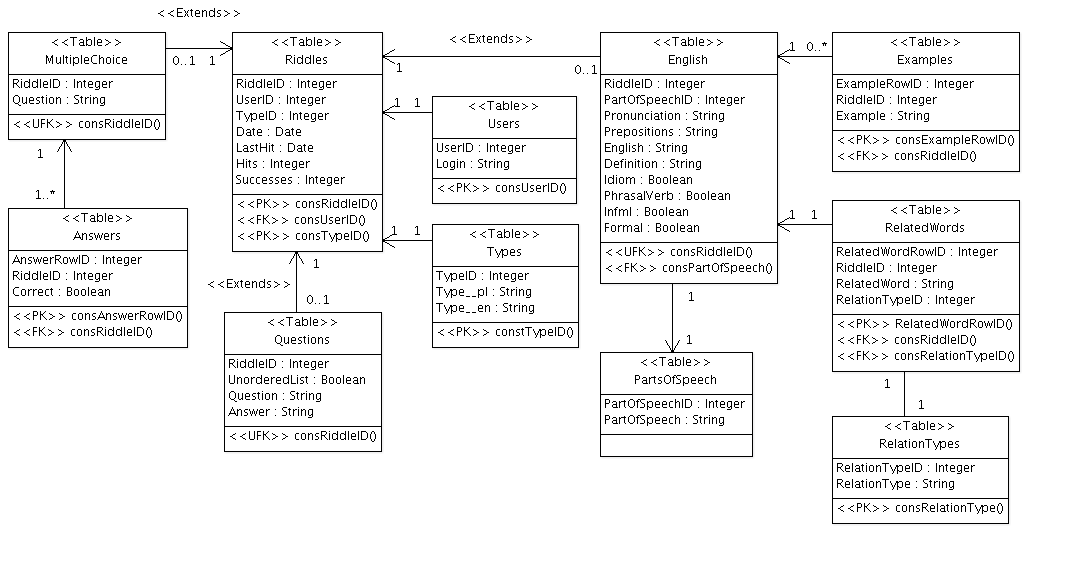
This example is taken from a service lemonh.com that I have created to improve my English. You can find here a configuration, database layout and a sample XML.
   package Boldh;

   my $attributes = {
      User => {
         Type => 'Complex',
         Reference => 'Riddle',
         Plural => 'Users',
         OneOne => 1,
         Enum => 1
      },
      Login => {
         Type => 'String',
         Reference => 'User',
         OneOne => 1
      },
      Type => {
         Type => 'Text',
         Reference => 'Riddle',
         OneOne => 1,
         Enum => 1,
         Plural => 'Types'
      },
      Date => {
         Type => 'Date',
         Reference => 'Riddle',
         OneOne => 1
      },
      LastHit => {
         Type => 'Date',
         Reference => 'Riddle',
         OneOne => 1
      },
      Hits => {
         Type => 'Integer',
         Reference => 'Riddle',
         OneOne => 1
      },
      Successes => {
         Type => 'Integer',
         Reference => 'Riddle',
         OneOne => 1
      },
      Active => {
         Type => 'Integer',
         Reference => 'Riddle',
         Virtual => 'unix_timestamp()-unix_timestamp(LastHit) > if(Successes < 3, Successes + 1, 1) * 60 * 60 * 24'
      },
      Random => {
         Type => 'Float',
         Reference => 'Riddle',
         Virtual => 'rand()'
      }
   }

   package Boldh::English;

   my $attributes = {
      English => {
         Extends => 'Riddle'
      },
      EnglishExample => {
         Type => 'LongString',
         Reference => 'English',
         Plural => 'EnglishExamples'
      },
      EnglishCutExample => {
         Type => 'LongString',
         Reference => 'EnglishExample',
         OneOne => 1
      },
      Word => {
         Type => 'LongString',
         Reference => 'English',
         XmlChunk => 1,
         OneOne => 1
      },
      Definition => {
         Type => 'LongString',
         Reference => 'English',
         OneOne => 1
      },
      Pronunciation  => {
         Type => 'String',
         Reference => 'English',
         OneOne => 1
      },
      PartOfSpeech => {
         Type => 'String',
         Reference => 'English',
         Plural => 'PartsOfSpeech',
         OneOne => 1,
         Enum => 1
      },
      Prepositions => {
         Type => 'String',
         Reference => 'English',
         OneOne => 1
      },
      PhrasalVerb => {
         Type => 'Integer',
         Reference => 'English',
         AsAttribute => 1,
         OneOne => 1
      },
      Idiom => {
         Type => 'Integer',
         Reference => 'English',
         AsAttribute => 1,
         OneOne => 1
      },
   };
    <Riddles>
      <Riddle Approval="0" ID="425" Formal="0" PhrasalVerb="0" Idiom="0" Derogatory="0" Informal="0" RowID="425">
        <Type ID="1" RowID="425">
          <Text>English</Text>
        </Type>
        <Word Value="hawk" RowID="425"/>
        <Definition RowID="425">
          <Text>to go from place to place offering things for sale</Text>
        </Definition>
        <Prepositions Value="~ sth (about/around)" RowID="425"/>
        <EnglishExample RowID="510">
          <EnglishCutExample RowID="510">
            <Text>The streets were full of people ~ing their wares</Text>
          </EnglishCutExample>
          <Text>The streets were full of people hawking their wares</Text>
        </EnglishExample>
        <EnglishExample RowID="511">
          <EnglishCutExample RowID="511">
            <Text>He ~ed his songs around for ages until record company finally accepted them</Text>
          </EnglishCutExample>
          <Text>He hawked his songs around for ages until record company finally accepted them</Text>
        </EnglishExample>
        <PartOfSpeech ID="2" Value="Verb" RowID="425"/>
        <Pronunciation Value="hɔːk" RowID="425"/>
      </Riddle>
    </Riddles>